The Social Jukebox for Spotify, Apple Music & YouTube

Let everyone at the party request songs, vote on what plays next, and enjoy the music together — while the host stays in control.

The Jukebox App is a social jukebox for parties and group listening. Start a session, connect your music service, invite guests from their phones, and let the room help decide what plays next.
Spotify YouTube Apple Music
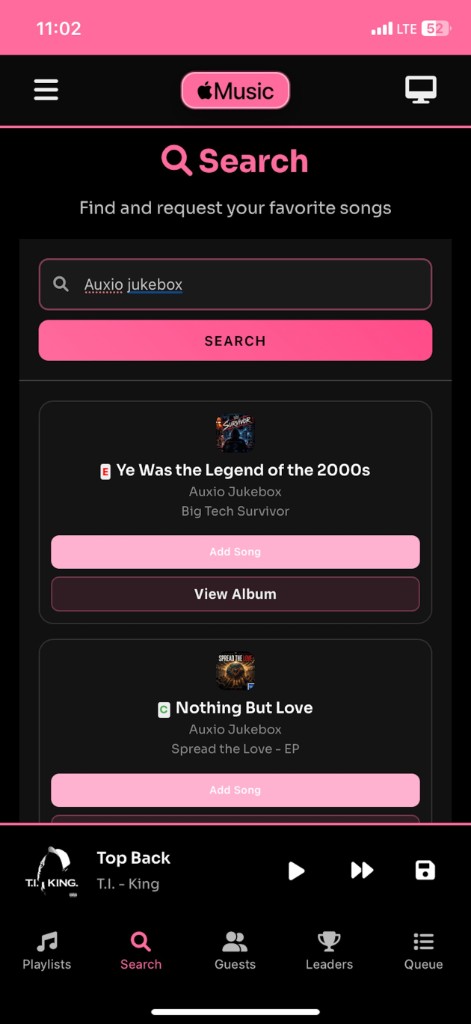
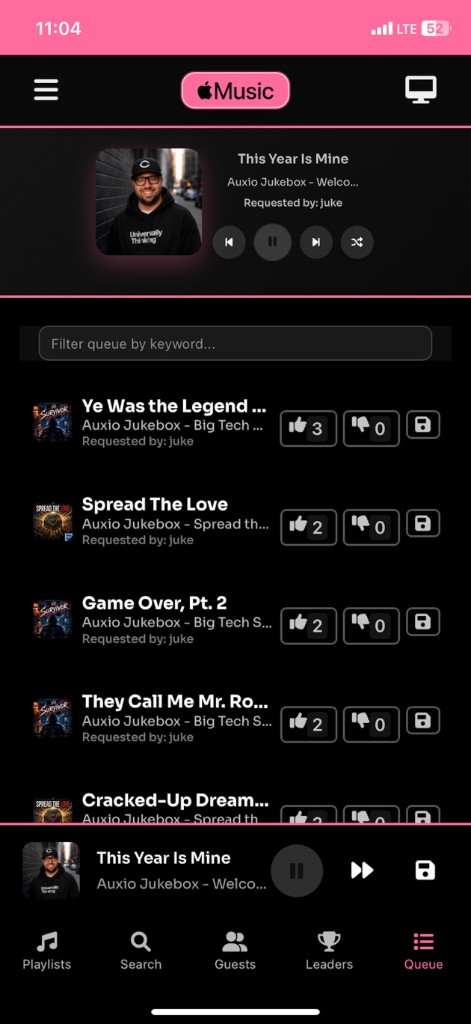
Apple Music queue on iPhone with voting controls
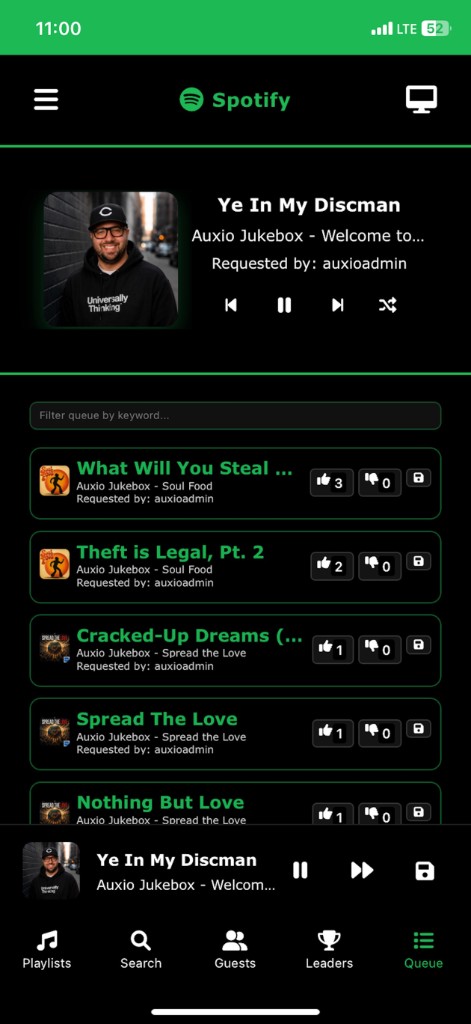
Spotify queue on iPhone with voting controls

How The Jukebox App Works

Four steps from empty room to shared music experience.

Step 1

Start a Party

Choose Spotify, YouTube, or Apple Music and start a Jukebox session on phone, desktop, or TV.

Step 2

Invite Your Guests

Share your party code or QR invitation so guests can join from their own devices.

Step 3

Let Everyone Participate

Guests request songs, vote tracks up or down, and watch the queue update as the party goes.

Step 4

Stay in Control

The host controls playback and party settings while the group influences what plays next.

Your Music. Your Party. Everyone Gets a Say.

The Jukebox App supports Spotify, Apple Music, and YouTube through dedicated app experiences for each platform. Learn more about the product →

Spotify

The core social jukebox experience: host a party, connect Spotify, share a code, and let guests request and vote on tracks in your queue. Available on iOS, Android, desktop, Fire TV, and Google TV.

YouTube

Run a YouTube-powered jukebox for music video parties. Host at swaggeryoutube.com or on TV apps, then let guests join with your party code. Available on iOS, Android, desktop, Fire TV, and Google TV.

Apple Music

Host Apple Music parties through the dedicated Auxio app on iOS or the Swagger Jukebox app on Android—download links are in the Apple Music section below.

What can guests do?

  • Join with a party code from their phone
  • Join through a QR code shown by the host
  • Request songs for the queue
  • Vote songs up or down
  • See what is playing and what is coming next
  • Participate without taking playback control from the host

You're the DJ. Everyone else gets a voice.

  • The host starts the session and connects the music service
  • Guests contribute requests and votes from their phones
  • The host controls playback, permissions, and party settings
  • Built for group listening at real gatherings—not solo playlists

A jukebox everyone can participate in

Instead of passing one phone around, everyone uses their own device to shape the music.

Start Invite Request Vote Play

The Jukebox App brings the classic jukebox idea to modern streaming: party codes, guest requests, voting, and a shared queue—on phones, computers, and TVs.

Built for groups

Designed for parties, events, road trips, and anywhere a group wants a shared soundtrack.

House Parties

Let everyone add songs and vote without passing one phone around the room.

Weddings & Events

Give guests an easy way to request songs and participate in the music.

Road Trips

Let passengers contribute to the soundtrack from their own phones.

College & Group Gatherings

Turn choosing the music into part of the social experience.

Built like the apps you want to download

Dark, polished interfaces on phone and TV—queue control, search, playlists, and a living-room view your guests can read from across the room.

Spotify queue with upvote and downvote controls
Spotify
Apple Music queue with voting controls
Apple Music

Guests vote tracks up or down, see what's playing, and watch the queue respond in real time.
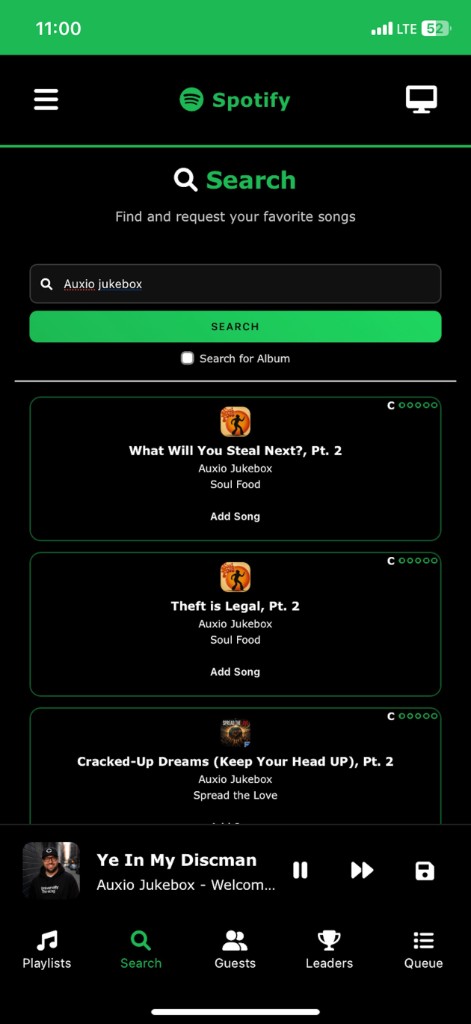
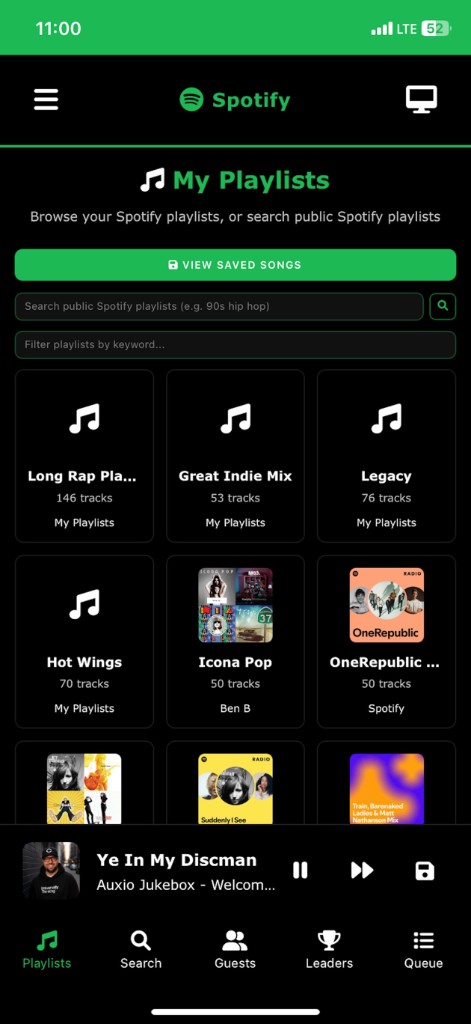
Spotify playlists browser for party setup
Spotify

Browse your library or search public playlists to seed the party queue.
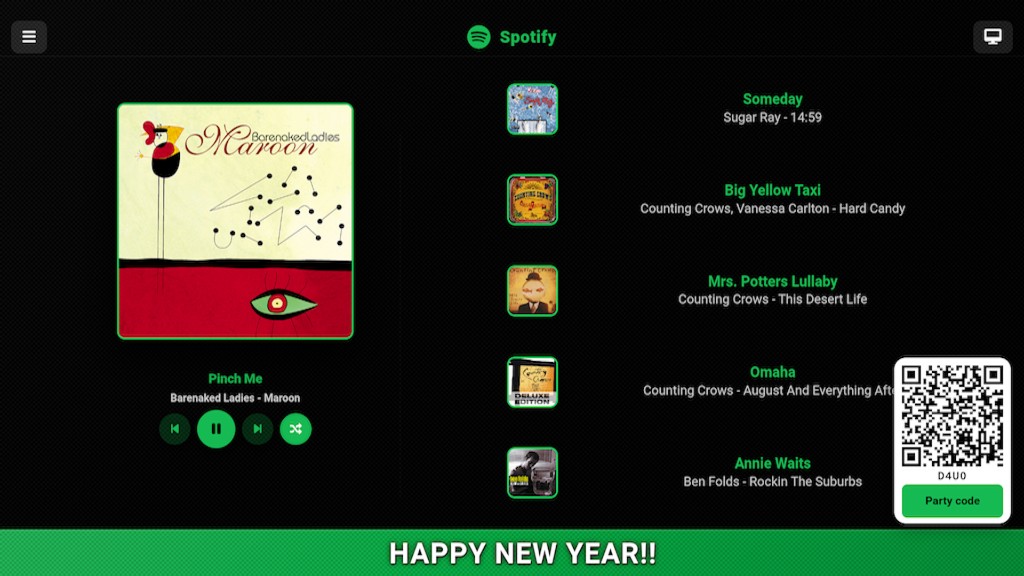
Spotify jukebox on TV with now playing, queue, and party QR code
Spotify on TV
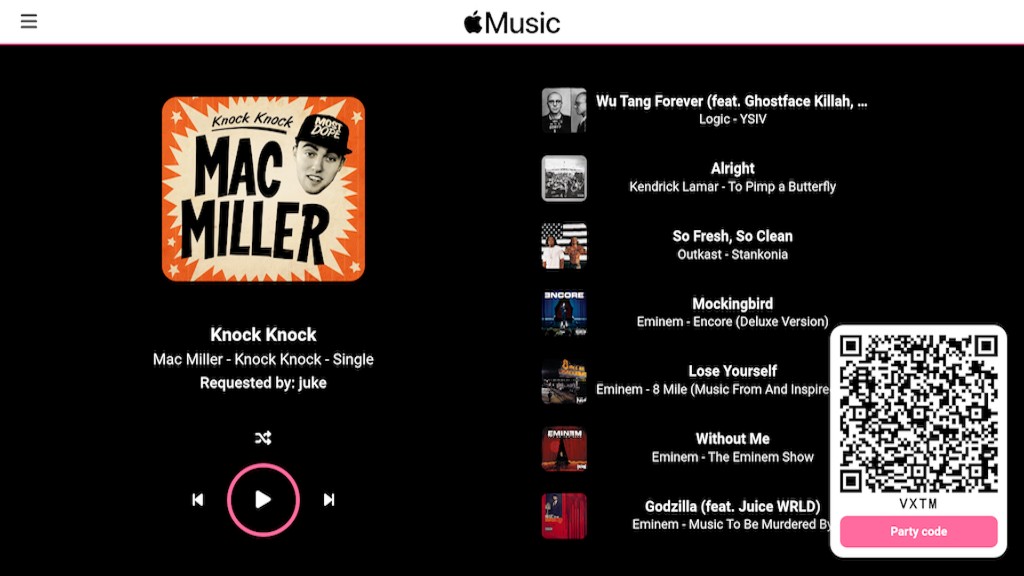
Apple Music jukebox on TV with now playing, queue, and party QR code
Apple Music on TV

Host on Fire TV, Google TV, or desktop. Guests scan the QR code or enter your party code to join.

Party codes & QR join Guest voting Song requests Host stays in control Phone, desktop & TV

Download Your App

Pick Spotify, YouTube, or Apple Music—same social jukebox experience on phone, desktop, and TV.

Spotify Jukebox

The original social music experience

iOS App

iOS App

Download for iPhone and iPad

Download
Android App

Android App

Download for Android devices

Download
Desktop App

Desktop App

Download for Mac and Windows

Fire TV App

Fire TV App

Download for Amazon Fire TV

Google TV App

Google TV App

Download for Google TV

YouTube Jukebox

Import a Spotify playlist for a Music Video party, or start from scratch!

iOS App

iOS App

Download for iPhone and iPad

Download
Android App

Android App

Download for Android devices

Download
Desktop App

Desktop App

Download for Mac and Windows

Fire TV App

Fire TV App

Download for Amazon Fire TV

Google TV App

Google TV App

Download for Google TV

Apple Music Jukebox

Seamless integration with Apple's ecosystem

iOS App

iOS App

Download for iPhone and iPad

Download
Android App

Android App

Download for Android devices

Download
Desktop App

Desktop App

Download for Mac and Windows

What Our Users Say

What party hosts and guests are saying

Frequently Asked Questions

Everything you need to know about The Jukebox App

View the full FAQ page →

What is The Jukebox App?
The Jukebox App is a social jukebox that lets hosts and guests request, vote on, and participate in controlling music at parties and other group gatherings. The host stays in control while guests join from their phones.
What is a social jukebox?
A social jukebox lets a group participate in choosing the music instead of leaving the entire playlist to one person. Guests request songs, vote on the queue, and see what plays next while the host controls the session.
Does The Jukebox App work with Spotify?
Yes. The Spotify version is the core social jukebox experience on iOS, Android, desktop, Fire TV, and Google TV. Hosts connect Spotify; guests join with a party code to request and vote.
Does The Jukebox App work with Apple Music?
Yes. Apple Music parties use dedicated apps on iOS (Auxio) and Android (Swagger Jukebox). Download links are in the Apple Music section below.
Does The Jukebox App work with YouTube?
Yes. YouTube parties use the YouTube Jukebox web app and TV apps. Guests can join with the host's party code after the host starts a YouTube session.
Can guests request songs?
Yes. Guests can request songs for the queue from their phones. Hosts can allow or restrict song requests in the party menu.
Can guests vote on songs?
Yes. Guests can vote songs up or down. Hosts can toggle guest voting on or off with the "Allow Guest Voting" menu option.
How do guests join a Jukebox party?
Guests enter the host's party code in the mobile app. Hosts can also share a QR code from the party screen on TV.
Do guests need an account?
No. Guests do not need a Spotify, Apple Music, or YouTube account to join. They need the party code (and optionally a nickname) to request and vote.
Can The Jukebox App be used at a party?
Yes. The Jukebox App is designed for house parties, events, road trips, and other group gatherings where everyone should have a say in the music.
Can The Jukebox App be used for weddings?
Yes. Many hosts use it for weddings and events so guests can request songs and participate in the queue from their phones.
Can The Jukebox App be used on a TV?
Yes. Host on Amazon Fire TV or Google TV with the dedicated TV apps, or use the desktop web app on a computer connected to a TV.
Can I play music through multiple phones in different locations?
Yes! You can set up a Spotify "Group Session" to accomplish this. Have the Host of the party send you their Group Session link and you'll be able to listen on your phone too.
Can I play music through Sonos?
Yes! You can choose your Sonos speaker in the Spotify mobile app. If you're hosting on a computer you can choose "Change Playback Device" in the menu and then select Sonos in the Spotify mobile app.
Initial setup takes a few minutes... do I have to do this every time?
Nope! After you set up your first party, each subsequent party is a breeze. All you have to do from then on is tap or click "Host a Party" and you'll be sent straight to the queue screen to pick up where you left off.
Guests keep skipping songs... can I turn this off?
Yes! You can toggle guest's ability to change songs ON and OFF in the menu. It's the menu option labeled "Allow Admin Access." The default is set to ON. Toggle this OFF to prevent them from skipping songs.
What is "Admin Access"?
Admin access gives guests elevated privileges. Guests you give the Admin Password to can remove songs from the queue, control playback from their phone and add more votes and songs more often. We recommend you give yourself Admin Access if you're hosting on a device other than your phone - so you can better control the queue.
I gave the wrong person Admin Access... Can I change the password?
Yes! You can change the Party Name and Admin Password in the menu under the option 'Change Codes.' Changing the Party Name will kick everyone out of your party - so leave it blank or type in the current party name to keep the party going!
Is there a way to disable voting?
Yes! You can toggle guest's ability to vote ON and OFF in the menu. It's the menu option labeled "Allow Guest Voting." The default is set to ON. Toggle this OFF to prevent them from voting.
What is paywallios.herokuapp.com and why do I have to log in through a browser?
That's a web app we run on Heroku (an AWS tool) for initial party setup. The reason you log in through a browser is because of Android and iOS security policies regarding OAuth. Logging in to Spotify (and similar services) must use a web browser for authentication.
Can I cross-fade songs?
Yes, you can currently cross-fade songs if you host in the Android or iOS app for Spotify. Just choose the "X-FADE" option, under the currently playing song's metadata in the queue. Cross-fading is not possible with the Desktop or TV versions of this app.
Can I delete my data?
Yes, you can delete your data by hosting on a mobile device and selecting "Delete Account" in the menu. You should also go to Spotify.com and 'deauthorize' The Jukebox App if you no longer plan to use our service.
What platforms are supported?
We support Spotify, YouTube, and Apple Music across iOS, Android, desktop, and TV platforms including Fire TV and Google TV. All platforms are free to use!

Check Out Our Other Apps

Explore more apps from our team

CalendMe

Smart scheduling made simple. Schedule times to hang out with your friends, with ease.

Visit

Pixxy

Turn any device into a Frameo style slideshow display. Collaborative Slideshow app.

Visit

Universally Thinking's Blog

Thoughts on technology, development, and innovation from our team.

Visit Blog

Bible Time

Daily scripture and devotionals. Schedule your daily reminders and devotionals.

Download

Bar Games

Games to play while you're waiting at the bar... or anywhere else!

Download

Contact Us

Get in touch with us